FreeRADIUS PAP Challenge Authentication using rlm_perl

Let's see how to configure the FreeRADIUS2.x application to respond with an Access-Challenge for incoming Access-Request messages using the rlm_perl module scripting

System Specifications:

Ubuntu 12.04 LTS (i686 i686 i386 GNU/Linux)
FreeRADIUS v2.1.10


Configuration:

Step 1:

Edit the “clients.conf” file in the /etc/freeradius directory and add the Client's IP details as below

client 192.168.3.33 {
 secret = testing123   < -- Shared secret between Client and Radius server
 shortname = NodeToBeAuth
 netmask = 32
}


Step 2:

Edit the “users” file in the /etc/freeradius directory and add the users to be authenticated as below

user1 Auth-Type := Perl   < -- Use rlm_perl module for Authentication
user2 Cleartext-Password := "abc#123"  < -- Use plain text password for Authentication


Step 3:

Edit the “perl” file in the in the /etc/freeradius/modules directory and specify the script you would like to execute when the Auth Type is set to Perl as above in the users file

perl {
 module = ${confdir}/challenge.pl < -- Perl script on the /etc/freeradius directory
}


Step 4:

Enable the rlm_perl module by editing the “inner-tunnel” and the “default” files in the /etc/freeradius/sites-available directory as follows. Add the perl module under the authenticate section so that the perl module will be included and loaded when FreeRADIUS is started

authenticate {
 Auth-Type Perl {
  perl
 }
.
.
.
.
}


Script for Authentication:

Copy the example code posted on the official FreeRADIUS website and paste into a file named as challenge.pl in the /etc/freeradius directory

http://wiki.freeradius.org/modules/Rlm_perl

Edit the subroutine authenticate() as follows

# Function to handle authenticate
sub authenticate {
    # For debugging purposes only
    if ($RAD_REQUEST{'User-Name'} =~ /^baduser/i) {
            # Reject user and tell him why
             $RAD_REPLY{'Reply-Message'} = "Denied access by rlm_perl function";
             return RLM_MODULE_REJECT;
    } else {        < -- Any user except a bad user
            # Accept/Challenge user and set some attribute
  $RAD_REPLY{'State'} = "some state code here";
              $RAD_REPLY{'Reply-Message'} = "Enter the pin number";
  $RAD_CHECK{'Response-Packet-Type'} = "Access-Challenge"; < -- Send challenge back
  return RLM_MODULE_HANDLED;
    }
}


The above logic can be extended for the case of a user responding to the Access-Challenge by handling the condition of verifying the user response to the challenge found in the RADIUS attributes of the response message

Verification:

Start the RADIUS server in debug mode. Make sure that no freeradius daemon already running in the background before starting the server

# freeradius –X
{or}
#LD_PRELOAD=/usr/lib/libperl.so.5.14 /usr/sbin/freeradius –X  < -- Ubuntu 12.04 bug


Now test plaintext password authentication for user 2 as below

# radtest user2 abc#123 127.0.0.1 0 testing123
Sending Access-Request of id 203 to 127.0.0.1 port 1812
    User-Name = "user2"
    User-Password = "abc#123"
    NAS-IP-Address = 127.0.1.1
    NAS-Port = 0


rad_recv: Access-Accept packet from host 127.0.0.1 port 1812, id=203, length=20

Now test challenge authentication for user 1 as below
# radtest user1 doesntmatter 127.0.0.1 0 testing123
Sending Access-Request of id 33 to 127.0.0.1 port 1812
    User-Name = "user1"
    User-Password = "doesntmatter"
    NAS-IP-Address = 127.0.1.1
    NAS-Port = 0

rad_recv: Access-Challenge packet from host 127.0.0.1 port 1812, id=33, length=60
    Reply-Message = "Enter pin number"
    State = 0x736f6d6520727461746524636f66652068657265


Please note that we are doing this testing using localhost (127.0.0.1) and the NAS-IP-Address should point to the RADIUS server IP address for remote RADIUS server. Please refer to the wiki page of FreeRADIUS for configuration details of FreeRADIUS 3.x or higher

References:

http://wiki.freeradius.org/modules/Rlm_perl

HTC One 2013 - Personal Review


Got a feel of the brand new unlocked phone from HTC this year and felt like sharing my thoughts here. The first thing I liked about the phone is its looks and how it felt on my hand. The phone comes in a zero gap perfect metal case with all the buttons neatly tucked in giving it a seamless appearance and soothing feel to the palms. HTC have got it right with the phone dimensions and it is very comfortable to operate the phone on one hand. The phone's curvy back felt a bit odd when I first held the phone but I think we will get used to this shape and might start feeling better as days go by. The power button is moved to top which I think is a good idea as I always ended up squeezing the power button while adjusting volume on other android phones. The power button also doubles up as an infrared port which can be used for remote control. I didn't quite like the roughness of the scales on the volume adjust button on the right as it was not a good feeling on my fingers while adjusting volume. Apart from that HTC One deserves a top rating on the form factor and the tactile side of the body of the phone. 

HTC One powered by the Android operating system delivers all the goodness of Android along with a few custom specialties  The HTC Blinkfeed is a gift for users to read news feeds and social network updates from the home screen. The Blinkfeed could well have been inspired by Live Tiles of the Windows platform but certainly looks a lot more cleaner and efficient in terms of home screen real estate utilization. HTC One has also embraced Google Now which is like the Siri of the Apple world and it can be easily accessed by long pressing the home button. Google Now can be handy outdoors getting you the right information at the right time. The Video Highlights feature lets you instantly create a short mash-up movie from your existing images and videos in the gallery.

HTC One also shines on the entertainment factor. With 468 PPI the HTC One display screen is easily the best I have seen on smart phones so far and watching high definition video on this high resolution screen is a bliss to our visual senses. The camera is a 4MP "UltraPixel" camera which I would have preferred to be at least 8MP. But the camera comes with a lot of valuable features like the HTC Zoe and Slow Motion recording. HTC Zoe captures a series of images continuously for 3 seconds which can be later edited using the inbuilt photo editor. The photo editor presents a gamut of picture editing options and features that enable you to edit and retouch your photos on the phone without the need for an external application. The gallery also has the preview feature that plays videos and Zoe captures one by one within the small frames of the gallery screen. Another interesting aspect of the phone is its speakers and the HTC BoomSound. With beats audio enabled, one can actually feel the energy of the dual front facing stereo speakers powering away the sound waves towards you. Again a top rating for the display and the speakers. 

One thing I found a little annoying is that one couldn't access the frequently used functions such as WiFi, Screen Rotate, GPS, etc by a drag down of the status bar or notification panel on the home screen. Just as I thought we need to go to settings every time, I realized that you can add these shortcuts as widget on one of your home screens. I was also wondering how to access the recently accessed applications but later found out that one simply has to double tap the home button to access the multitasking screen and close those apps which we don't want to be running in the background. 

While the phone has that sleek looks and sophisticated software elements, I have my doubts over the phone heating up pretty quickly which you could feel on your palms while working with the phone over an extended period of time. I wonder if it is because of the metal casing that the heat gets to your hands sooner than expected. Overall HTC One is a brilliant phone with all the hardwork put in by HTC and it will certainly satisfy an average smartphone user any day.

Tutorial to continuously measure the Bluetooth RSSI of a connected Android device (Java)


Bluecove RSSI Polling Android
Bluetooth RSSI - Nexus7 & Nokia Xpress Music
At the time of this writing, there is no Android API available to continuously retrieve the RSSI of an existing bluetooth connection even though API exists for getting WiFi RSSI. The current API will get the Bluetooth RSSI only during the initial connection setup process. In this article we will find out how to continuously get the Bluetooth RSSI of an Android device and a Nokia Mobile Phone from a computer running Linux.

The RSSI of any device connected to the computer can be determined by using the hcitool in Linux. But this may not be possible with commercial Android devices as root access is required in order to call any functions from the Bluetooth HCI layer using the Android NDK. For experimental purposes, in order to exploit the bluetooth equipment onboard commercial handheld devices, we shall measure the RSSI of these devices by connecting them to a computer or a laptop.

In this experiment the RSSI is being measured continuously in motion from an Android Device (Nexus 7 Tablet) and a Nokia Mobile Phone (Xpress Music) from a computer based on Ubuntu. The source code uses the Bluecove bluetooth library to extract the RSSI information from these connected devices. The Android device and the Nokia device acts like a server and the computer acts like a client.

At the computer, we need to write the client code that will continuously poll the RSSI from our known devices. In order to do this we need to first checkout the bluecove bluetooth libraries from here (http://bluecove.org/source-repository.html). Then we can make use of the BluetoothRSSIPollingClient.java to get the RSSI readings. We can filter out the other discovered devices using the Bluetooth MAC address of our known devices. We can obtain the Bluetooth MAC address of a device from the Preferences Tab of the Bluetooth Menu in Ubuntu after connecting the device with the computer.

Client:

public void PollRSSI()
{
try {
while(true)
                 {
        try {
        System.out.println();
        if(Android_Device != null)
        System.out.println("Android RSSI = " + RemoteDeviceHelper.readRSSI(Android_Device));
     } catch (Exception e) { System.out.println("Android RSSI = Connection Error"); }
        try {
        if(Nokia != null)
        System.out.println("Nokia RSSI = " + RemoteDeviceHelper.readRSSI(Nokia));
      } catch (Exception e) { System.out.println("Nokia RSSI = Connection Error"); }   
        Thread.sleep(2000);
                }
     } catch (Exception e){ e.printStackTrace(); }
}

For the Android device we need to write our own server code in order to overcome the [13] Permission denied error. We might need to run more than one server thread (AcceptThread.java) on the Android device so the incoming connection request will be finally accepted after an initial permission denied error. We will also specify the RFCOMM UUID and a Service name which the client can search and connect to. The entire server has to be implemented as a Service in Android (BluetoothRSSIService.java) so that the connection is not lost if the display screen is timed out.

Server:

public AcceptThread()
{
                   BluetoothServerSocket tmp = null;
                   mBluetooth = BluetoothAdapter.getDefaultAdapter();
                   mUuid = UUID.fromString("00000003-0000-1000-8000-00805F9B34FB");
        try {
                tmp = mBluetooth.listenUsingInsecureRfcommWithServiceRecord("BluetoothCustomService",      mUuid);          
             } catch (IOException e) { }
                myServerSocket = tmp;
         }

public void onCreate()
{
super.onCreate();

thread1 = new Thread(new AcceptThread());
thread1.start(); //First thread will often be denied
thread2 = new Thread(new AcceptThread());
thread2.start(); //Most probably be accepted

}

For the Nokia device there is no explicit server necessary and we can simply connect using the Bluetooth Serial Port Profile connection url. Once the connection is establish we can continuously poll the RSSI from both the devices periodically.

Note: RSSI of Bluetooth may not be an efficient and reliable parameter for applications such as indoor positioning

Source Code:

BluetoothRSSIPollingClient.java       AcceptThread.java       BluetoothRSSIService.java

References:

"A Bluetooth Based Supermarket Navigation System" - Pearl Manoharan, Vignesh Subramanian & Anusha Vutukuri - Course Project - Mobile Systems 16:332:559:02 F12 (Rutgers Fall 2012) -->
http://developer.android.com/guide/topics/connectivity/bluetooth.html
http://stackoverflow.com/questions/12251785/android-bluetooth-read-rssi-signal-strength
http://bluecove.org/bluecove-examples/bluecove-tester/index.html

How to execute SPEC95 benchmarks in Simplescalar?

Let us see how to run the SPEC95 benchmarks (little endian) namely compress95, anagram, go, cc1 and perl in Simplescalar simulator software. Each and every benchmark has a corresponding input file that specifies the input to the program and an output file which we can use to verify if our test was successful. Also we will be writing the output of our simulation to a file with a .out extension and we will be printing the execution trace with all the run statistics to a file with a .trace extension.

The little endian version of the benchmarks and the input and output files can be download from the below location. After extracting the archive,  place the folder BenchMarks_Little in the simplesim-3.0 folder of your simplescalar installation folder. All the benchmarks shall be executed from the simplesim-3.0 directory.

BenchMarks_Little.tar.gz

compress95:

The below command will execute the compress95 benchmark and print the output to compress95.out and log the execution trace to compress95.trace in the Results folder

./sim-outorder BenchMarks_Little/Programs/compress95.ss < BenchMarks_Little/Input/compress95.in  2> BenchMarks_Little/Results/compress95.trace > BenchMarks_Little/Results/compress95.out

go:

The below command will execute the go benchmark and print the output to go.out and log the execution trace to go.trace in the Results folder

./sim-outorder BenchMarks_Little/Programs/go.ss 50 9 BenchMarks_Little/Input/2stone9.in  2> BenchMarks_Little/Results/go.trace > BenchMarks_Little/Results/go.out

anagram:

Before executing the anagram program place the words file from the Input folder in the simplesim-3.0 directory. The below command will execute the anagram benchmark and print the output to anagram.out and log the execution trace to anagram.trace in the Results folder

./sim-outorder BenchMarks_Little/Programs/anagram.ss words < BenchMarks_Little/Input/anagram.in  2> BenchMarks_Little/Results/anagram.trace > BenchMarks_Little/Results/anagram.out

cc1:

The below command will execute the cc1 benchmark and print the output to 1stmt.s in the Programs folder and log the execution trace to cc1.trace in the Results folder

./sim-outorder BenchMarks_Little/Programs/cc1.ss -O BenchMarks_Little/Input/1stmt.i 2> BenchMarks_Little/Results/cc1.trace

perl:

Before executing the perl program place the perl-tests.pl file from the Input folder in the simplesim-3.0 directory. The below command will execute the perl benchmark and print the output to perl.out and log the execution trace to perl.trace in the Results folder

./sim-outorder BenchMarks_Little/Programs/perl.ss < perl-tests.pl 2> BenchMarks_Little/Results/perl.trace > BenchMarks_Little/Results/perl.out

References:

http://www.simplescalar.com/
http://www.igoy.in/simplescalar-installation-made-simple/
http://users.ece.gatech.edu/~hamblen/4100/course/simplescalar/Spec95%20Benchmark%
20Command%20Lines.htm
http://www.spec.org/osg/cpu95/

The MegaPixel (MP) Rating of a Digital Camera

The resolution of a digital camera is perceived to be proportional to its pixel count. A digital image is nothing but a continuous arrangement of pixels or picture elements. Resolution is expressed as the number of horizontal pixels multiplied by the number of vertical pixels (E.g. 1600x1200 => 1.92 MP). Digital cameras record visual image with the help of CCD or CMOS sensors and each pixel of the output image on screen will map to a specific pixel on the image sensor in the digital camera.

Digital Camera Resolution Formula MegapixelDigital Camera CCD CMOS PixelMegapixel Resolution Myth

In order to improve the resolution, one tends to simply increase the pixel count. The more the number of pixels the more details the image will provide and the more it will resemble to the real world image. But for a given image or sensor area, increasing the number of pixels tends to saturate at a certain point and further increase in pixels doesn't mean much to the human eye. A common man will not be able to accurately identify the difference in quality of a usual 10cm x 15cm photograph taken by digital cameras having resolution greater than 5 MP. But higher pixel count will be beneficial only when you are trying to generate a bigger picture from a smaller one or when you are trying to crop a particular portion of the picture and try to enlarge it.

There are some common misinterpretations of resolution which a camera manufacturer might try to exploit. Since resolution is more like a square function (length x height), gain in pixel count will not be directly related to resolution gain. Also some pixels on a digital camera sensor will be used for other compensation mechanisms and not really for capturing the image. Companies may include this overhead in order to bump up the pixel rating. In color displays such as LCD screens, subpixel rendering is used in which a single pixel will be composed of a three sub pixels (R, G & B) and so the pixel count should never be exaggerated. The size of the camera sensor also plays a part in deciding resolution, sharpness and image quality for digital cameras having the same pixel rating apart from other factors like lens quality, sensitivity of the image sensors, optical zoom capability, shutter speed, etc.

Triangulation/Trilateration in GPS

Global Positioning System (GPS) has made a tremendous impact in our life and has become immensely popular in recent times. GPS receivers are omnipresent and the applications of GPS extend beyond technology purposes. At the core of this wonderful technology is a simple mathematical/geometrical concept called trilateration or triangualation. Imagine you are lost one day and you don't even know if you are on the northern or southern hemisphere. All that you have is a GPS device with you to locate yourself.

To start off, you are situated somewhere on the surface of the earth (Now don't tell that the earth is not a perfect sphere). Your GPS device receives position and time (sent) information from GPS satellites and the distance is calculated based on the standard distance-time formula given the fact that radio signals from GPS satellites travel roughly with the speed of light. The key problem here is that you don't know the direction but you only know the distance from a satellite.
-->
-->


Consider the blue sphere as the earth E. We are trying to locate a point P on the surface of the earth.

When your GPS device calculates the distance x from satellite say S1, you know that you might be located anywhere on the surface of a sphere of radius x with S1 as the centre. But you don't know in which precise angle you are located in the 360 degrees. Now when your GPS device gets hold of another satellite S2 and calculates the distance y from it, you can apply the geometric principle that spheres intersect in a perfect circle to narrow down your position to somewhere on the perimeter of a circle. Now, the point at which this circle intersects with the earth should give your location on earth. Now when your GPS device calculates the distance z from a third satellite S3, the sphere of radius z with S3 as centre will intersect the circle of intersection of the other two spheres at two points. Only one of those two intersection points will actually lie on the surface of the earth and the other point will lie in space. The point on the surface of the earth will give your location on earth.

GPS satellites transmit time information derived from high accuracy atomic clocks but the GPS receivers cannot afford such high precision clocks. There are several factors that might introduce errors in GPS like clock inaccuracies, rounding errors, multipath and atmospheric effects, etc. Since the earth is also not a perfect sphere, GPS receivers generally look to four or more satellites to compute the precise location.

AppFabric Caching (aka Velocity Caching) - Microsoft .NET

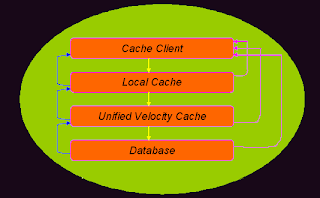
Caching is an essential component to speed up any web application by minimizing the number of trips to the actual database. AppFabric Caching or Velocity caching is a distributed caching system that leverages the caching infrastructure available across a cluster of cache servers efficiently to enhance application performance as well as scalability. The secret behind the effectiveness of appfabric caching lies in the fact that duplicate data is not cached by the cache cluster because whenever data is requested by any client, it is first looked up in the unified logical cache and if available the data that reaches the client can be from the physical cache memory of any of the servers in the cluster.

Appfabric Velocity Caching Architecture Design Overview Diagram

Velocity caching is implemented in a synchronized tier and the service can be accessed across the network with the cache servers in the cluster running the process (DistributedCache.exe). Even though several cache servers contribute to the shared cache memory, there is a common gateway for data to enter and exit in the form of a centralized and shared cache. The distributed cache is handled in code with the help of simple get and put methods that will retrieve, insert, update or delete data items in the unified logical cache as a whole. The programmer is not worried about the internal implementation or the physical location of cached data in the cluster.

Notable Aspects:
  • Each server in the cluster stores the session object data in its RAM and does not write it to disk for obvious reasons
  • No code change or new code has to be incorporated by the programmer and all that is needed is to change a configuration setting in order to activate velocity caching
  • Distributed caching means multiple web servers can each run an instance of the same application which helps in load balancing
  • Both web server (IIS) and cache server (Appfabric) can be deployed on a single application server running on Windows Server OS
  • Turning on the high-availability feature helps mitigate situations when a server in the cluster goes down by storing a synchronous secondary copy of the data item on a different server
One of the key challenges for the implementation of velocity caching involves managing parallel access to data that changes rapidly and velocity caching offers different concurrency models suitable for the concerned application. Controlling access to sensitive data among the clients is another challenge which is controlled by limiting access to such data with encryption or restricted accounts. Appfabric caching attempts to maximize the benefits from the underlying computer infrastructure with the help of a distributed yet shared architecture to provide value for both application developers and end users. Things can only get better from here.

Lava A9 Mobile Phone - Personal Review

Lava A9 India 3.2MP Camera Review

Lava A9 Dual Sim Phone is a handsome instrument with an assortment of useful features and applications at an affordable price. The phone looks solid with a hard metal body and a smooth keypad which gives an elegant appearance to the phone. Lava A9 comes with a 3.2MP camera that lets you take pictures and shoot videos but the image quality is very poor and doesn't live up to the expectations of a 3.2MP camera. The zooming option is also limited and the camera is a big let down in A9. There is 64MB internal phone memory and the phone will support up to 8GB Micro SD Cards. Listening to music on this phone is not a pleasant experience on the loud speaker but the audio quality is slightly better while hearing it on the ear phone. FM reception is also not satisfactory.

Having said the above glitches in the phone, Lava A9 is otherwise an excellent phone with an impressive profile. The phone comes with both EDGE and GPRS support enabling you to connect with the internet through the pre-installed Opera Mini web browser. Nimbuzz is a refreshingly new application that comes pre-installed with Lava A9 with which you can make calls or chat with your friends over the internet sans the conventional call charges. The phone with a user friendly interface has all the features we expect including bluetooth, java games, Ebook reader, Email support, MP3/MP4 Player, etc. Apart from the usual audio and video recorder the phone also lets you record streaming FM audio in any of the three formats WAV/AWB/AMR. You can also search your contacts with phone number as the search criterion which is handy at some situations. You can also integrate the phone with your PC with the help of Lava A9 PC Suite that can be downloaded from LavaMobiles.com website. Apart from the camera and loud speaker anomalies, LAVA A9 is a good looking phone with powerful features and provides value for money.

Samsung Corby S3653 - Mobile Phone Review

Samsung Corby S3653 Review FeaturesI had a chance to handle this phone after my friend bought it last week. As far as the design is concerned, holding the phone in my palms was a bit awkward considering the width (56.5 mm) of the phone but it is an advantage when it comes to a bigger screen experience. The phone with a plastic body is light weight but still sturdy and looks plain and simple. From the design perspective there is a dedicated keypad lock/unlock button on the right side. Virtual keypad means minimum buttons on the front panel and maximum screen size. The capacitive touchscreen performs well and the interface is intelligently designed for easy navigation of menu items. The menu icons can be docked on the left side for quick access or pulled out from the menu which spans 3 pages that can be easily flicked through. The 2MP camera shoots well in good lighting conditions and the single finger image zoom option is handy while viewing pictures. The phone has a gamut of applications and widgets to integrate with the internet and the social networking world. The sound quality is good and watching videos in a wide screen is comforting as well.
How to transfer data from one table to another table?

In software engineering profession everyday new challenges and problems turn up in the blink of an eye and as engineers we are obliged to resolve them ASAP. One of the biggest challenges in the IT industry today is handling data that is vast and increasing everyday. Data is normally stored in databases in the form of tables and a common situation while handling databases is to transfer data from one table to another.

Case I: If both tables reside in the same database server

Consider the case where you want copy the data from Table_1 under Schema_1 into Table_2 under Schema_2. A simple sql command to do this operation would be

INSERT INTO DB_Name.Schema_2.Table_2
SELECT * FROM DB_Name.Schema_1.Table_1 WHERE [condition]

If you want to insert only certain columns you can slightly tweak the command accordingly

INSERT INTO DB_Name.Schema_2.Table_2(COL1, COL2, ....COLn)
SELECT COL1, COL2, ....COLn FROM DB_Name.Schema_1.Table_1 WHERE [condition]

Case II: Load a table from a file

Consider the situation where you want to load a table from a delimited file. This can be done using the BULK INSERT command in Transact-SQL. In order to perform this operation you need access to the file present in the database server. CSV (Comma-seperated values) is a common format used to store the data from a table or spreadsheet. To load a database table from a .csv file use the following command

BULK INSERT Table_Name
FROM 'C:\Program Files\File.csv'
WITH
(
FIELDTERMINATOR = ',',
ROWTERMINATOR = '\n'
)

Bulk insert command provides a slew of options to load a table from a simple delimited text file or even from an xml file.

Case III: If both tables reside in different database servers

The bcp Utility is an excellent command line tool to transfer table data between two different database servers swiftly across a network. You can use bcp to extract table data by querying the table and store it in a delimited file. You can then load the other table from this delimited file easily using a simple bcp command. You don't even have to login to the servers to access the files.

bcp DB1.SCHEMA1.TABLE1 out FILEPATH -n -S[server_name\instance_name] -T -e[error_filepath]
bcp DB2.SCHEMA2.TABLE2 in FILEPATH -n -S[server_name\instance_name] -T -e[error_filepath]

-n uses the native (database) data types
-S should be added before server name
-T using a trusted connection
-e should be added before filepath for error file that logs the failed rows

The first command extracts the rows from TABLE1 and stores in the appropriate FILEPATH (eg. C:\Program Files\File.csv) in the database server. The second command loads TABLE2 with the data present in the File.csv. You have to run the first command to create the file first and then run the second command to load the data into the table. Instead of selecting the entire table you can also include your own select query within the bcp command. BCP offers a legion of options to transfer data between tables in different modes and formats.

Alternately you can also make use of Data Transformation Services (DTS)/ SQL Server Integration Services (SSIS) package in order to consolidate data from heterogeneous data sources.

Useful Resources:

bcp Utility - http://msdn.microsoft.com/en-us/library/ms162802.aspx
bulk insert - http://msdn.microsoft.com/en-us/library/ms188365.aspx

The Virtual Memory Concept

Virtual Memory is a cost effective solution to slake the thirst of memory hungry applications for a seamless experience with your operating system. To understand the concept of virtual memory you need a little knowledge about the memory organization and working. There are basically two types of memory you need to know. Random Access Memory (RAM) is faster but costly. Memory like hard disk is slower but relatively cheaper. Virtual memory is a stratagem to utilize the hard drive memory to achieve enhanced performance from the random access memory.

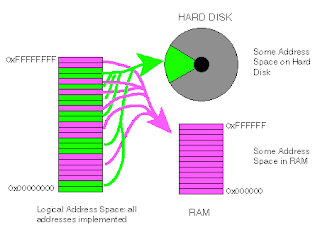
Whenever you run multiple programs/applications in your desktop, you will be working on only a portion of a particular application at an instant. Therefore it is a waste of resource to load the entire memory required for a particular application into the limited size random access main memory. In a virtual memory environment each page of a process is brought to main memory only when it is needed on demand.

Virtual Memory Block Diagram Working

Data is stored in any memory in the form of binary digits. The operating system handles memory management in the form of chunks of memory called pages. A page is nothing but a contiguous block of memory. One process might require multiple pages of memory but only a few pages might be active at a time. Virtual memory uses a technique called demand paging to effectively use the available RAM memory. Every page has an address which may be a virtual or logical address. The main memory is divided into equal size chunks called page frames and each page frame has a unique physical address. So whenever a page needs to be accessed, the operating system has to translate the virtual address into a physical address and this is done by a Memory Management Unit (MMU) with the help of mapping in a page table. The virtual address corresponding to a page is mapped to a physical address corresponding to a page frame in main memory. Whenever a page is not in memory the operating system fetches the page from hard disk in response to a page fault exception. The operating system usually makes a prediction based on past history using intelligent algorithms regarding those pages that are least likely to be needed again and places them in the hard disk.

A-GPS for the Novice

Assisted GPS is an improved version of conventional GPS and it has revolutionized mobile navigation systems across the globe. The A-GPS system relies upon an assistance server to accurately resolve the location of a device. A-GPS system is commonly used in mobile phones to provide real time navigation services. The Global Positioning System works on the principle of trilateration to determine the coordinates of a point on earth. In this principle a satellite is considered to be at the center of a sphere and the mathematical treatment of three such spheres/satellites gives the intersections of the spheres which are used to determine the coordinates. By including one more sphere/satellite in the analysis the point can be located more precisely. The distance between the point on earth and the satellite is computed by transmitting a packet of data tagged with the sent time and by subtracting this from the time the packet was received, we get the time of transit. Assuming the packet traveled at the speed of light, we can estimate the distance of the satellite which serves as the radius of the sphere.
Assisted GPS Working Block Diagram
The standalone GPS system is susceptible to atmospheric conditions and multipath errors which tend to prolong the time to first fix. This is not appropriate for real time navigation and emergency applications. A-GPS offers a solution to this problem with an architecture that makes use of data connectivity to an Assistance server located at a place with strong signal connectivity with the satellites. There are two possibilities here.

  • The assistance server may transmit orbital parameters and atomic time information to the mobile phone via the network. The GPS receiver in the mobile phone correlates this data with the fragmentary data received directly from the satellites thereby increasing its sensitivity and resulting in a quicker time to first fix.
  • The mobile phone with limited processing capabilities can delegate the processing function to the more sophisticated assistance server by sending the weak fragmentary data to the processing server that has good satellite signal and receive the position information from the server through the network.

A-GPS is a feasible option to provide navigational services in an urban environment with tall buildings and high radio interference. On the flipside the service provider will charge the subscriber for network data traffic using GPRS/3G.

Linux Server Time Zone $TZ Problem - Yesterday Date Script

I encountered a peculiar problem in a shell script that was used to find the yesterday's and tomorrow's date using the environmental variable TZ. The script that was previously written to find yesterday's date on a server that was located in EDT time zone was

YesterdayDate=`TZ="EDT+24" date`

But unfortunately the code failed to give the correct date of yesterday and instead it gave today's date. I thought of digging deep into this issue and logged in to a linux server to investigate the matter. After some long manipulations I observed something.

Unix server time zone $TZ

BST is 1 hour ahead of UTC $ YesterdayDate=`TZ="BST+23" date`

The script "EDT+24" gave only GMT/UTC time and inorder to get the correct timezone I needed to add the offset value for the particular time zone. After I made the changes the script seems to be working fine.

EDT is 4 hours behind of UTC $ YesterdayDate=`TZ="EDT+28" date`

CDT is 5 hours behind of UTC $ YesterdayDate=`TZ="CDT+29" date`

MDT is 6 hours behind of UTC $ YesterdayDate=`TZ="MDT+30" date`

PDT is 7 hours behind of UTC $ YesterdayDate=`TZ="PDT+31" date`

I'm still a bit confused as to why the $TZ is behaving so unexpectedly.

Note: I'm just a novice and not an expert in Unix or Shell Scripting. I just wanted to share my experience with timezones on linux servers.

Nokia 5130 Express Music - Mobile Review

Nokia 5130 Xpress Music Colors


Last week I wanted to buy a mobile phone for my father and I was hunting for an economical music phone with camera and GPRS. Since I was buying it for my dad, I preferred Nokia because of the user friendly interface their phones have. When I inquired my friends, almost everyone suggested the Nokia 5130 Xpress music phone. I was convinced with the looks of the phone and bought it.

Pros

The Price of the phone is the crowd puller. With a 2.0 Megapixel Camera, 1GB microSD card storage, Bluetooth, GPRS and a sleek design, Nokia 5130 is a smart buy option.

I would give 9 out of 10 for the design and form factor. Everything is neatly packed, smoothly finished and custom fabricated with the buttons ideally located for a perfect music phone. The backlighting effect is appreciated.

I'm a person who prefers phones with a bigger display. Nokia 5130 display area is not the largest ever but definitely satisfying for a budget phone with compact design.

The music quality and stereo effects are good to hear in the headphone. The keypad is robust and comfortable to type.

Initially when the phone was introduced people complained about hanging problems and phone getting automatically restarted issues. Its been a week since I bought the phone and there are no issues till now.

Cons

The battery was a bit of a let down by Nokia. When I opened the back panel and found that the battery is the same old BL-5C that created a hullabaloo not long ago was psychologically disappointing.

The microUSB data cable that came along with the phone was incredibly short and there is absolutely no way I can place my phone on the table once I plugged it in the PC's USB slot.

Bluetooth is the only plausible data transfer option. The microUSB cable is short and there is no software CD in the package.

Inability to connect to Wi-Fi networks, lack of office tools, cheesy loud speakers at high volume, etc are desirable features missing on the phone.

What is a VPN?

Virtual private network is a cost effective solution for companies to extend network connectivity to its employees in every corner of the globe. Consider a company sends an employee to another country that is far away from the company headquarters on a secret mission. There must be some way for the employee to retort to the company and access the private network of the company in a secure way. The company cannot install a private network across countries because it would be expensive. Therefore they must find a way to communicate with the employee in a secure manner using the internet. This is were a virtual private network comes in to the picture. A VPN is a private network connection that is virtual in the sense that there is no dedicated private physical network connecting the entities. But the traffic is sent via the public internet that is vulnerable to attack in a secure manner. Private traffic is carried on the public network in a safe manner using several technologies like encryption, firewalls, authentication, IPsec, etc. VPN gives an organization the freedom to clandestinely communicate with its outbound employees in an economical fashion.

Solar Energized Housing Complex

A housing complex in Kolkata is designed to tap solar energy and utilize it for household applications. It is also possible to feedback energy to the grid when excess power is available. The residents will also get paid for the power returned to the grid. This project is the first of its kind in the country and is expected to inspire the nation. This photo voltaic technology is already in use in Europe and other developed nations. Photo voltaic technology basically involves materials that emit electrons when light is incident on them. Our former president Abdul Kalam had also urged the young students of our country to research on photovoltaic energy. The solar tiles embedded on top of the roof in this complex are able to generate 2KW of power. When there is a shortage of solar power the grid will supply power and when solar power is surplus the reverse process happens. Tapping solar energy will bring down the internal temperature of houses during summer. Power will be available even when there is a conventional power cut. The most crucial aspect of solar powering homes is that it will reduce the amount of carbon emission which will have an impact on global warming. Cost is a major constraint in implementing the system in countries like India but things are looking up for the future.

WaiverWire announces free Stimulus Package

WaiverWire - the leading NFL resource on the web has launched a free tool known as "The Stimulus Package" to let NFL fans join the fantasy football bandwagon. The 2009 NFL season promises a visual treat to the fans and WaiverWire.com gives a bird's eye view of the NFL action on the web. Those who cannot afford the premium packages can access the tools and statistics offered by WaiverWire free of cost by signing up for "The Stimulus Package". My love for fantasy football is undying and my favorite NFL player is Knowshon Moreno. The high flying running back is a class apart and I love him for his on field acrobatic adventures. I'm expecting a brilliant show by my man this season and hopefully Denver can make it to the top this time. But my money is on Nnamdi Asomugha and he might turn out to be the extraordinary performer this season. Throughout this season I'll be keeping an eye on player statistics and rankings delivered by WaiverWire in the hunt for the best player of NFL 2009. People at my office often talk about their favorite players and flaunt their NFL knowledge. Now that I have signed up with WaiverWire, I can make use of the player comparison feature and give an apt repartee to them.

Pasanga - Film review

Pasanga is an interesting film that touches the depths of childhood and school life. The film starts off in a wobbly manner with the kids being portrayed as naughty bugs and some of the scenes just fail to connect us to our own childhood. The director could have made a better attempt in depicting school life in my opinion. But the story settles down nicely interwoven with childhood egos and family sentiments. The love between Vimal and Vega is the most beautiful aspect of the movie. They are wacky yet passionate and capture our hearts with their sublime performance. The film has a strong message for parents. Parents must keep their own differences apart and encourage their children to succeed. The director has exhibited his true talent in the scene between the heads of both the families near a pond. The music is satisfactory with "Oru Vetkam Varuthe" and "Iraiva Iraiva" still lingering in my mind. Pasanga is a complete family entertainer and it is worth a watch.

Pen drive virus

Yesterday I got a pen drive from my friend and inserted it into my PC. The pen drive had some video clips and pdf books which my friend had put from his system. Unfortunately when I opened the pen drive on my system, my anti-virus software alerted me about some viruses and worms in the pen drive. So I selected the heal option and some of the viruses where quarantined. After cleaning up I again opened the pen drive. To my surprise all the folders and files were missing and the drive was empty. I was very much disappointed because it had important data and I was eager to access them. When I checked the properties, it showed that the drive is full. So I got an idea. I just right clicked on the pen drive icon and clicked on search option. Voila! All the files became visible in the search results. I copied them from the search window in to my own hard drive. What a misery with viruses and worms..!

Waiverwire Real Time Football Analysis Tools

Football is a challenging game for the people who work behind the scenes to help their teams win matches. They need real time alerts and information as soon as possible to stay ahead in the race. WaiverWire is the ultimate source of fantasy football rankings, analysis softwares, drafting tools, news and updates. They have introduced a new In- Season Pass for just $9.99 in order to get access to premium information and expert utilities for the entire 2009 season. The package includes real time player alerts and updates, fantasy football analysis, over 100 feeds from local beat writers, player projections and comparisons and access to Waiver Wire’s Fantasy Social Network and community forum. New graphically enhanced visual analysis tools and customized SOS by position are the added benefits. This is a special offer for the inaugural season and you can't afford to miss this opportunity. By signing up with waiverwire you become eligible for unlimited benefits to improve the performance of your team. Every successful team out there has a secret behind its success. The In- Season Pass could be your secret of success because no other website offers so much benefits as waiverwire. Waiverwire believes in the power of information and it doesn't miss even a single bit of information.